

Timelines
Track & visualize your time

Time is precious, are you using it wisely? Timelines helps you make the best use of your time.
Timelines
Track & visualize time
Time is precious, are you using it wisely? Timelines helps you make the best use of your time.
Time is our most valuable resource
Timelines helps you make the best use of your time




Timelines at a glance
Timelines is your personal, easy-to-use yet powerful time tracker. See your day on an interactive timeline, watch your weeks add up in charts, and build habits that actually stick.
- Works on
- iPhone, iPad & Apple WatchiOS 16 and watchOS 9 or later
- Pricing
- Free to download3 categories free, PRO $40 / year, 7‑day free trial
- App Store
- Rated 4.8 out of 5 10,000+ monthly users
Available since 2016 - Made by
- Lukas PetrIndie app developer in Prague
Find out where your days go
It’s hard to change what you can’t see. With a clear picture of your days, you’ll start to notice what takes up your time, and you’ll be able to improve step by step, making more room for what matters to you.
- Sleep
- Commute
- Focused work
- Lunch break
- Family
- Procrastinating

Easily track any activity
Create a timeline for each project or activity that you care about. Then use timers to keep track of what you’re doing. You can also add events retrospectively and adjust their times.
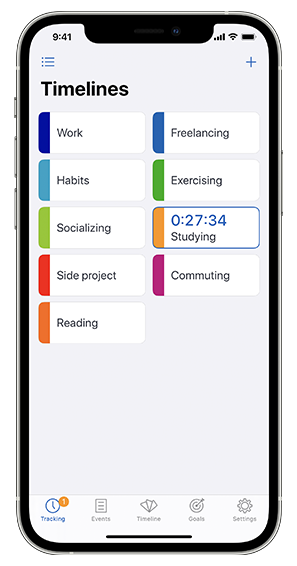
See exactly how you are spending your time
With Statistics mode and the interactive timeline, you can quickly scale from the big picture overview down to a single day.

Stay motivated to reach your goals
Define daily, weekly, and monthly targets for your categories, and get rewarded for reaching them with confetti. 🎉

Track time from the comfort of your wrist
With Timelines for Apple Watch, you can control timers without pulling your phone out of your pocket.

- Start and stop timers with 1 tap
- Correct timers with digital crown
- Set event names using dictation
- It works even without phone connection
See trends over time
With interactive bar chart, you can see how your time spending habits evolve over days, weeks, months, and beyond.

Get instant overview with widgets
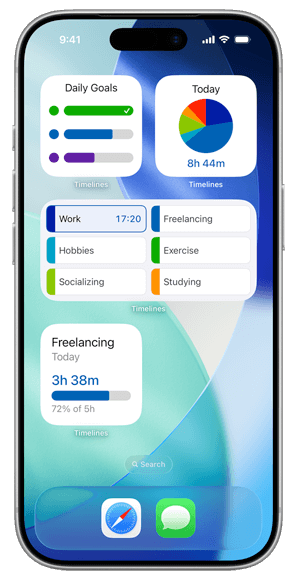
Follow your goals, statistics, individual categories, and tracking status right on your home screen.
Here’s what users are saying
It's very easy to use and visualizes the collected data in a meaningful way that gives me a realistic view of how I'm spending my time and also helps me stay motivated.
— Ehsan Iran Nejad , architect
Timelines has, in just a few days, helped me curtail some undesirable habits. I look forward to making further progress and salute the maker. Awesome idea!
— George Cochrane, writer
I've tried numerous other time tracking apps and methods for finding where my days go - nothing even comes close to this. I honestly believe that if I had this app 5 years ago my life would be different.
— Michael Whitaker, musician
The background story
“I personally wasn’t happy about the way I was spending my time, which is one of the main reasons why I decided to build this app. Timelines has been helping me and other users be more aware of our time and use it more wisely. It is also my passion and I’m dedicated to it 100%. There are big plans for the future (read more in Press Kit). Have any questions or comments? Email me and I’ll reply within 24 hours.”

Lukas Petr
Independent app developer
Founder of Timelines
Frequently asked questions
What’s free, and what comes with PRO?
Timelines is free to download, and the free version lets you track up to 3 categories, with the timeline, pie chart and reminders included. Timelines PRO adds unlimited categories, sync between your devices, goals, bar charts, detailed exports, and Apple Health and Calendar import. It costs $39.99 a year or $7.99 a month in the US (prices vary by country), with a 7-day free trial. Every PRO subscription helps us keep making Timelines better, as we have since 2016.
What if I forget to start or stop a timer?
No problem, it’s easy to fix. You can change an entry’s start or end time afterwards, or add a whole entry later. Timelines can also remind you when no timer is running, or when one has been running for too long, so you’re less likely to forget. A Lock Screen widget makes it easy to see what you’re tracking and go straight to your timers.
Does the Apple Watch app work without my iPhone?
Yes. Timelines has had an Apple Watch app since day one, and it works on its own, not just as a remote for your iPhone. You can start and stop timers from your watch face, add notes by voice, adjust start and end times with the Digital Crown, and check your statistics, even with your iPhone left at home. With PRO, everything you track on your watch also syncs to your iPhone and iPad. You can learn more on our Apple Watch page.
Can Timelines track my time automatically?
Timelines is made for manual tracking, on purpose: starting a timer means deciding to focus on that one thing. For the routine parts of your day, though, it can start and stop timers for you through Shortcuts automations, for example when you arrive at the office, join your home Wi‑Fi or connect to CarPlay. With PRO, you can also bring in workouts and sleep from Apple Health, and events from your calendar. The app includes short setup guides for all of this.
Do I need an account? Is my data private?
No account needed: Timelines works fully offline, and your data stays on your device. An account is only needed for Timelines Cloud, the optional sync between devices, and that data is stored on our own server. There are no ads, your data is never sold, and nothing is used for targeting. We do collect usage statistics, but only to learn which features people use and what to improve next.
Is it for personal use or for work?
Both. People use Timelines to track study sessions, workouts, music practice, reading, family time and chores, as well as their job or freelance projects. With PRO, the detailed CSV export includes the start and end time of every entry, ready for timesheets or invoicing. Timelines is made for individuals, though, so it doesn’t do invoicing or team features.
Can Timelines help with ADHD or time blindness?
Many people with ADHD tell us Timelines is the first time tracker that actually stuck for them. Seeing your day laid out on a timeline makes time feel less invisible. Starting a timer takes one tap, even from your watch, and Timelines can remind you when you’ve forgotten to start one, or when one has been running for too long. There are no streaks to break either, so you can use it as much or as little as you need.
Which devices does Timelines work on?
Timelines works on iPhone and iPad with iOS 16 or later, and on Apple Watch with watchOS 9 or later. On a Mac with Apple silicon, you can run the iPad app, and a native Mac app with menu bar controls is planned. With PRO, your data syncs between all of them. Timelines isn’t on Android, Windows or the web yet, but you can join the Android waitlist to hear when it’s ready.
Start taking control of your time, today
Join thousands of people who are already using Timelines to become more productive and lead more fulfilling and intentional lives.